Discover amazing transparent wallpaper tricks for Android phones! Learn how to set live see-through wallpapers step-by-step and make your screen look stunning.
Introduction:
Have you ever wished your Android phone could look truly futuristic — like you can see through it? 😍
Transparent wallpapers make that dream come true! These unique wallpapers create a live camera view on your home screen, making your phone appear crystal clear and ultra-cool.
In this step-by-step guide, you’ll learn how to set transparent wallpapers on Android, the best apps to use, and some amazing customization tricks to make your phone stand out. Whether you’re going for that sleek, techy look or just want to surprise your friends — this guide has you covered!
What Is a Transparent Wallpaper?
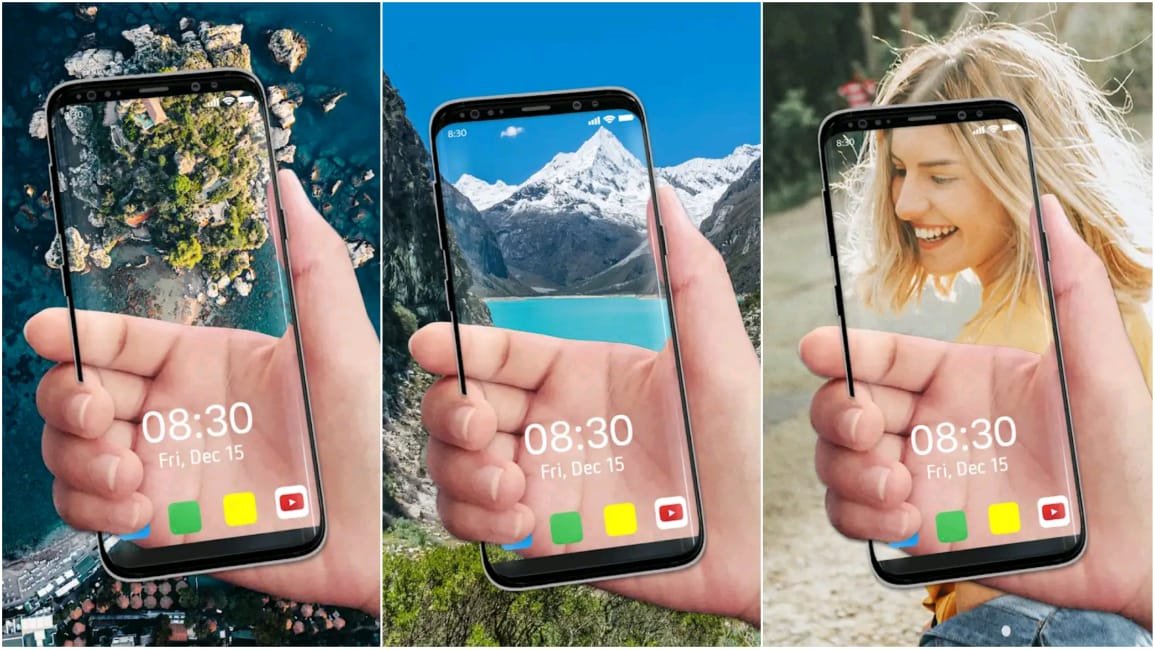
A transparent wallpaper (also known as a live see-through background) uses your phone’s rear camera to display what’s behind your device — in real time — as your home or lock screen wallpaper.
It creates an illusion that your screen is invisible, giving your Android device a cool, glass-like effect.
Benefits of Using Transparent Wallpapers:
- Looks futuristic and unique
- Fun way to personalize your Android screen
- Works with almost all Android versions
- Lightweight and easy to apply
- Great for showing off to friends!
How to Make Your Android Wallpaper Transparent (Step-by-Step Guide)
Setting up a transparent wallpaper is super easy. You don’t need root access or special permissions — just follow these steps carefully.
Step 1: Choose a Reliable Transparent Wallpaper App
There are several apps that help you set transparent wallpapers. Here are a few trusted ones available on the Google Play Store:
- Transparent Screen & Live Wallpaper
- Transparent Live Wallpaper HD
- Camera Transparent Wallpaper App
- See Through Wallpaper – Transparent Background
💡 Pro Tip: Always download from the official Play Store to avoid malware or fake apps.
Step 2: Install and Launch the App
Once downloaded, open the app. You’ll usually see a welcome screen asking for camera and display permissions.
- Tap Allow Camera Access (this is needed to make the wallpaper see-through).
- Then, tap Set Transparent Wallpaper or a similar option.
Step 3: Adjust Transparency Settings
Most apps let you adjust brightness, blur, or opacity to create the perfect look.
Here’s what you can do:
- Adjust brightness for outdoor visibility.
- Add a blur effect for a stylish background.
- Enable battery saver mode to reduce camera usage.
You can preview changes live before applying them — a great way to experiment!
Step 4: Set It as Your Wallpaper
After customizing the settings:
- Tap Set Wallpaper
- Choose whether to apply it to the Home Screen, Lock Screen, or Both
- Enjoy your transparent, see-through Android wallpaper! 🎉
Best Transparent Wallpaper Tricks for Android
Want to make your transparent wallpaper even cooler? Try these expert tricks:
1. Combine Transparent Wallpaper with Live Clock Widgets
Add a digital clock or weather widget on top of your transparent background. It gives your phone a futuristic HUD-style display — like something out of a sci-fi movie!
2. Use Transparent Wallpapers with Edge Lighting
Pair your transparent wallpaper with edge lighting apps. The glowing border around your screen adds an elegant touch that looks especially stunning at night.
3. Create a Transparent Lock Screen Effect
Set your transparent wallpaper for both the home and lock screen. When you unlock your phone, it looks like your screen seamlessly merges with the real world.
4. Add Floating Icons or Animations
Some customization apps allow floating app icons or animations on top of your wallpaper. Combine this with transparency for an interactive 3D effect.
5. Use Transparent Wallpapers with Motion Effects
Many apps let you use gyroscope motion — the wallpaper moves slightly when you tilt your phone, creating a dynamic, depth-filled look.
Safety Tips for Using Transparent Wallpaper Apps
- Avoid apps that request unnecessary permissions (like contacts or location).
- Always read user reviews before downloading.
- Don’t download APKs from unknown websites.
- Periodically check your camera permissions and privacy settings.
Remember — keeping your phone safe is just as important as keeping it stylish! 🔒
Why You’ll Love Transparent Wallpapers
Transparent wallpapers are more than just a visual gimmick — they represent creativity, personalization, and tech elegance.
They make your Android phone feel more alive, and they’re perfect for users who love minimal, clean, and dynamic designs.
Whether you’re using it to impress your friends or just to give your screen a modern twist, transparent wallpapers are an easy and fun upgrade you can try today.
Conclusion
Transparent wallpapers are one of the coolest customization tricks you can try on your Android phone right now.
They’re fun, futuristic, and surprisingly easy to set up — no special tools or skills needed.
So go ahead — download a transparent wallpaper app, follow the steps above, and give your phone a stunning, see-through makeover! 🌈
If you found this guide helpful, don’t forget to share it with your friends and leave a comment below about which transparent wallpaper app worked best for you.